SOP-06 Points Merge & Account Deduplication
Reference: STG-TICK-045
Audience: Head Office Checkers, Real Rewards Admins
Environment: Production (rewards.cpl.com.pg)
1. Overview
Customers frequently accumulate duplicate Real Rewards accounts (e.g., registering online with an email, then registering in-store with a phone number). This utility provides Head Office Administrators the ability to selectively merge duplicate accounts into a single "Primary" account, rolling up all loyalty points into one unified ledger balance without losing historical transaction integrity.
2. Step-by-Step Merge Instructions
When an Administrator executes a Merge from the UI, follow these steps:
- Log into the Real Rewards backend (
https://rewards.cpl.com.pg). - Navigate to the Members app.
- Click the Members dropdown menu and select Merge Accounts.
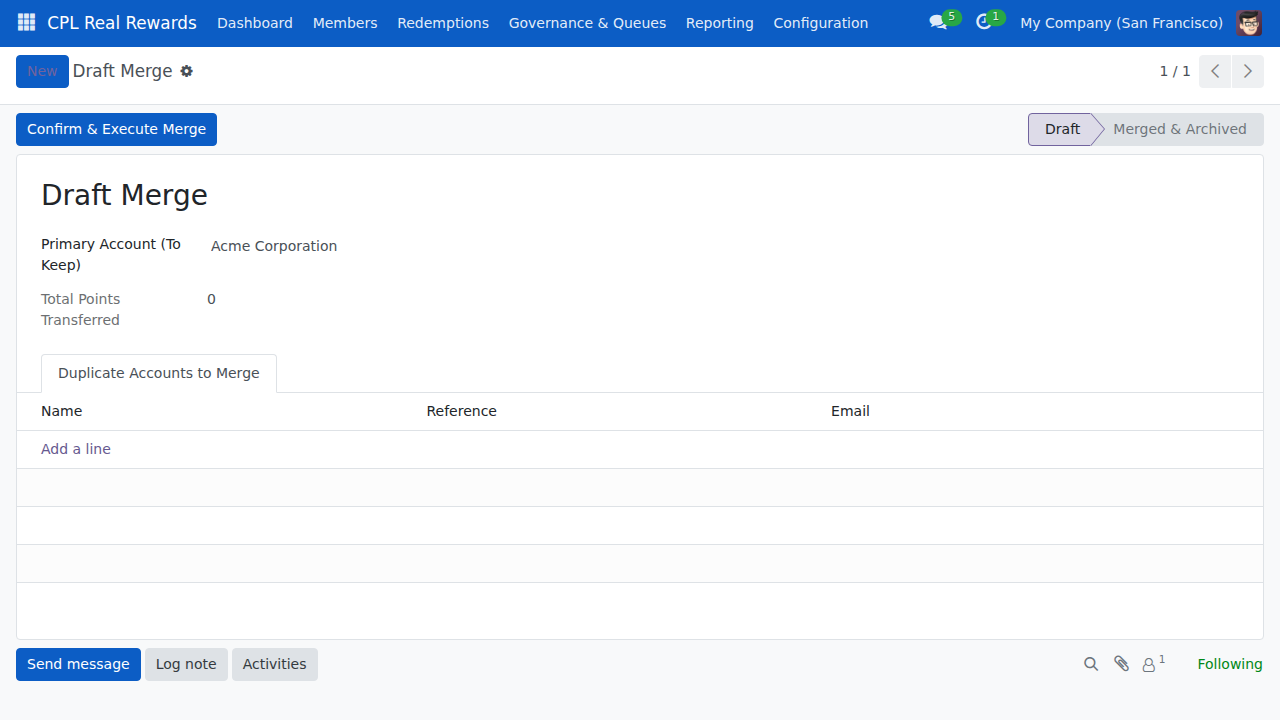
- Click New to create a new merge transaction.
- In the Primary Account (To Keep) field, search for and select the definitive account that should remain active.
- In the Duplicate Accounts (To Archive) field, select one or more accounts that belong to the same member.
- Click the Save icon (cloud with an arrow). The system will automatically calculate the Total Points Transferred.
- Verify the total points calculation is correct.
- Click the Execute Merge button at the top left.
3. Technical Merge Workflow (What Happens Behind the Scenes)
The system executes the following deterministic transaction:
Pre-flight Validations
- The system ensures the Primary Account is not accidentally listed inside the Duplicate Accounts list.
- If the Primary Account does not already have an underlying
loyalty.card, the system automatically provisions one using the member's reference code.
Points Deduction (Duplicate Account)
For every duplicate account selected:
* The system locates the active loyalty.card for that duplicate.
* A negative adjustment is posted directly to the real.rewards.loyalty.ledger with the note Merged into [Primary Account Name] (Ref: MERGE-XXX).
* The duplicate card balance is hard-reset to 0.
Points Credit (Primary Account)
- The exact integer value extracted from the duplicate account is appended to the Primary Account's
loyalty.cardbalance. - A positive adjustment is posted directly to the
real.rewards.loyalty.ledgerwith the noteMerged from [Duplicate Account Name] (Ref: MERGE-XXX).
Archival & Communication
- The duplicate account is marked as Inactive, removing it from active POS searches.
- The duplicate account's name is renamed to append
[MERGED]. - Automated Chatter notes are posted on both profiles summarizing the points transferred and the accounts archived.
4. Visual Reference